![trekksoft-whitelogo.png]](https://support.trekksoft.com/hs-fs/hubfs/trekksoft-whitelogo.png?height=30&name=trekksoft-whitelogo.png)
Here's an overview of what we cover in this article:
________________________________________________________________________
Overview
This flexibility allows your customers to select a time and date that suits them. Therefore, voucher schedules are typically used for private tours, as gift certificates, or for transfer services.
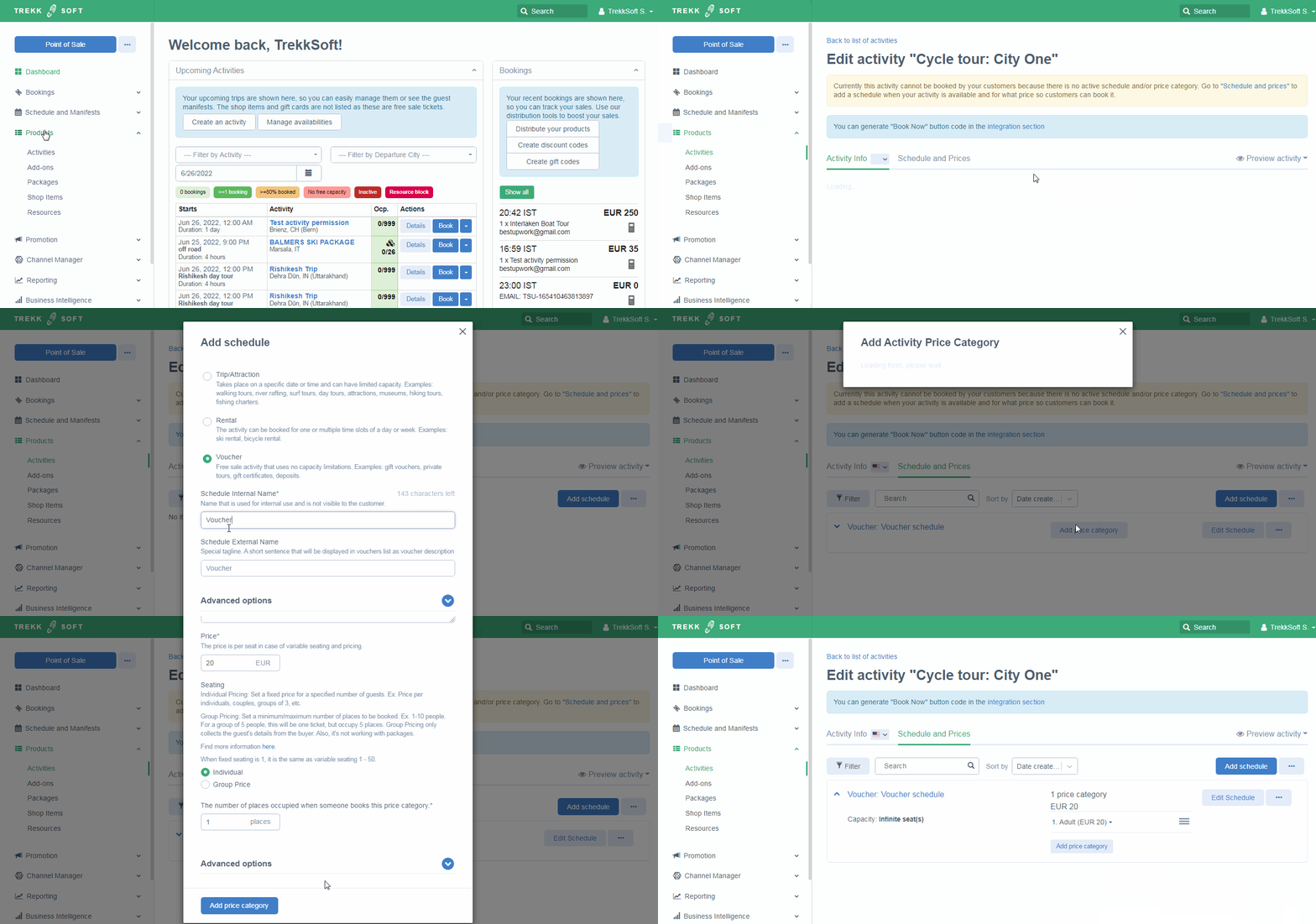
Follow the steps below to create a voucher schedule:
- Log into your Admin Desk (e.g. yoursite.trekksoft.com)
- In the left-hand menu, click on Products > Activities
- Click to edit an existing activity or create a new activity
- In your activity, click on the Schedule & Prices tab at the top
- Click on the Add schedule in the top right corner and select the Voucher option
- Complete each of the following fields:
- Schedule Internal Name - Enter a name for your schedule. This schedule will be visible internally only. This is a required field to put.
- Schedule External Name - Enter a name for your schedule. This schedule will be visible by your guests (external). This is an optional field.
- Advanced Options - Is Active - Make sure this option is ticked so the activity is active
- Once you have added the voucher, you must add a price category so the voucher is available for purchase. You can find more information about price categories here.
- Don't forget to Save once you have completed all the information!
________________________________________________________________________
Screencast Tutorial
Below is a screencast of how to add a voucher and price category as explained in the steps above:
IMPORTANT NOTES
- Voucher schedule don't have any capacity limit. It can accept unlimited guests. For example a Free Tour.
- Voucher schedule don't have any start or end date or time. It can be used when no any specific date or time needed.