![trekksoft-whitelogo.png]](https://support.trekksoft.com/hs-fs/hubfs/trekksoft-whitelogo.png?height=30&name=trekksoft-whitelogo.png)
Here is what we cover in this article:
_______________________________________________________
Overview
Resending documents and notifications is helpful when a guest does not receive their original booking confirmation or related emails. This can happen for various reasons, such as temporary technical issues on the sender’s or recipient’s side, or because the email was delivered to the spam folder. The resend function allows you to quickly deliver important booking information again, helping guests stay informed and prepared before their tour departure.
_______________________________________________________
How to re-send notifications to Guests
Follow the steps below to re-send the notifications to guests:
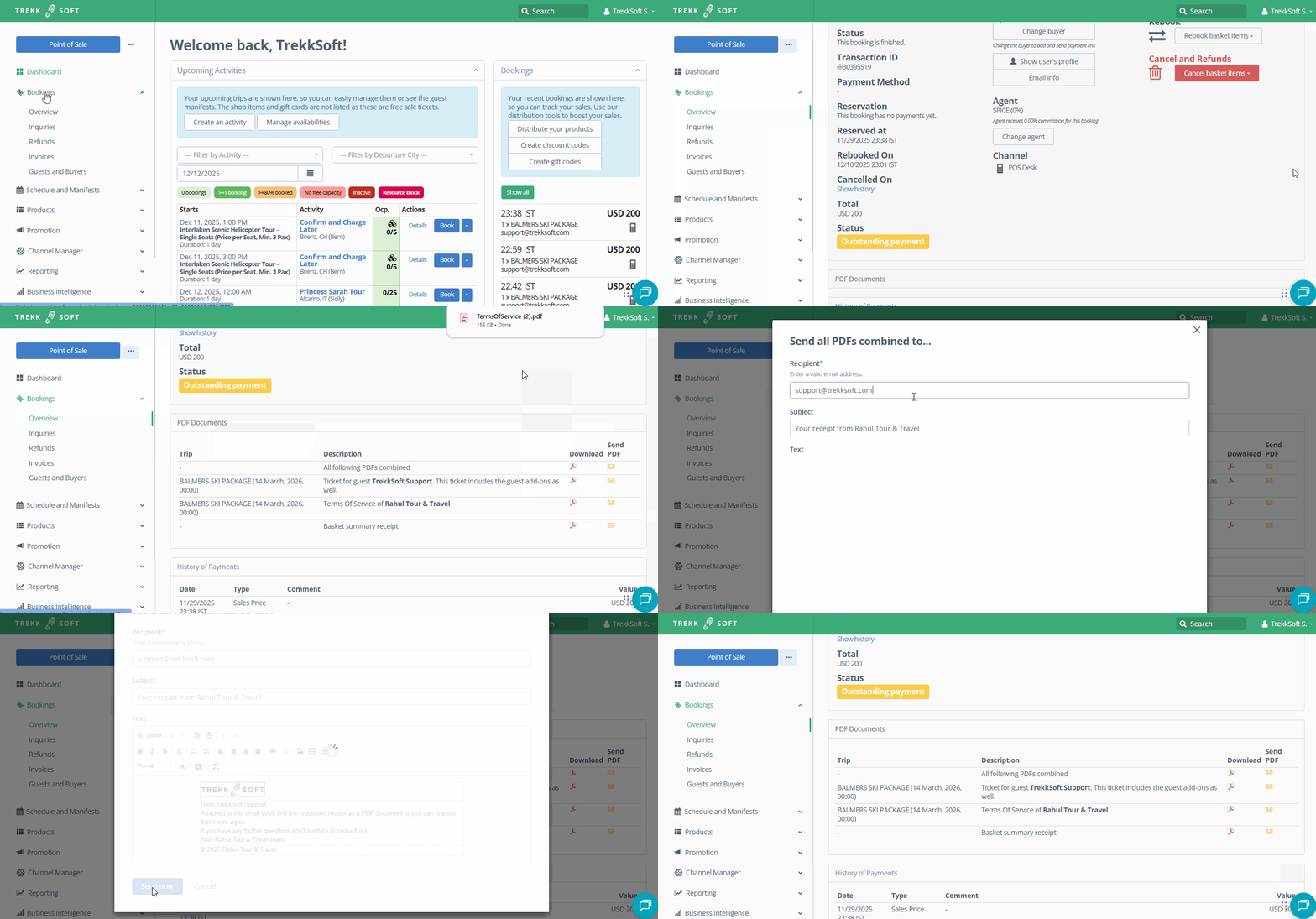
- Head over to the Basket Details for the specific order. To get there, go to the left navigation menu, select Bookings > Overview and then click on any of the column for the relevant booking.
- Scroll down to PDF Documents section. Find the documents you would like to resend. You can choose to Download the documents and send them via your email account, or you can click on the envelope icon to Send PDF from TrekkSoft.
- If you select Send PDF, a new window will appear for you to fill out details of the email.
- When you're done, click on the Send now button.