![trekksoft-whitelogo.png]](https://support.trekksoft.com/hs-fs/hubfs/trekksoft-whitelogo.png?height=30&name=trekksoft-whitelogo.png)
You can find the ID of your activities by following these steps:
(or scroll to the bottom of the page and watch the video instructions!)
1. Open your Admin Desk (e.g. login to yoursite.trekksoft.com)
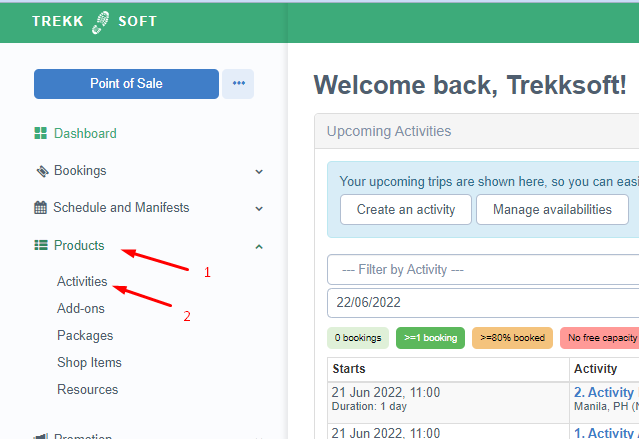
2. On the left-hand menu, click on Products> Activities.
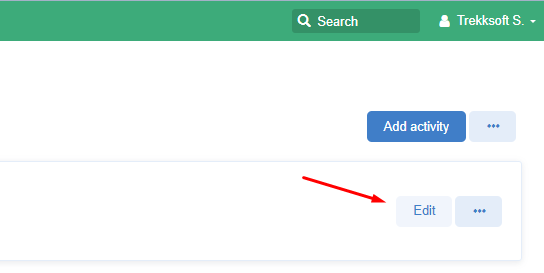
3. Choose the activity you wish to find the activity ID for and click on the edit button. A new tab will open.
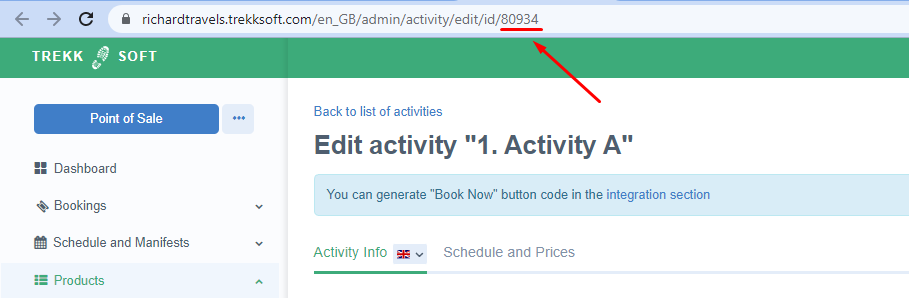
4. In the new tab, The ID is shown in the URL (in the address bar)
Last Updated: 06/22/2022