![trekksoft-whitelogo.png]](https://support.trekksoft.com/hs-fs/hubfs/trekksoft-whitelogo.png?height=30&name=trekksoft-whitelogo.png)
Pre-trip reminders are useful for reminder your customers that they have an upcoming trip that they have booked on one of your activities, while post trip reminders are useful for gathering customer feedback with their experience from the services that you have given to them.
Here's an overview on what this article covers:
Where to find this feature?
First you'll have to access the backoffice of your website. From there go to Settings > Checkout, Taxes & Fees > then go to the "Reminders" Tab.
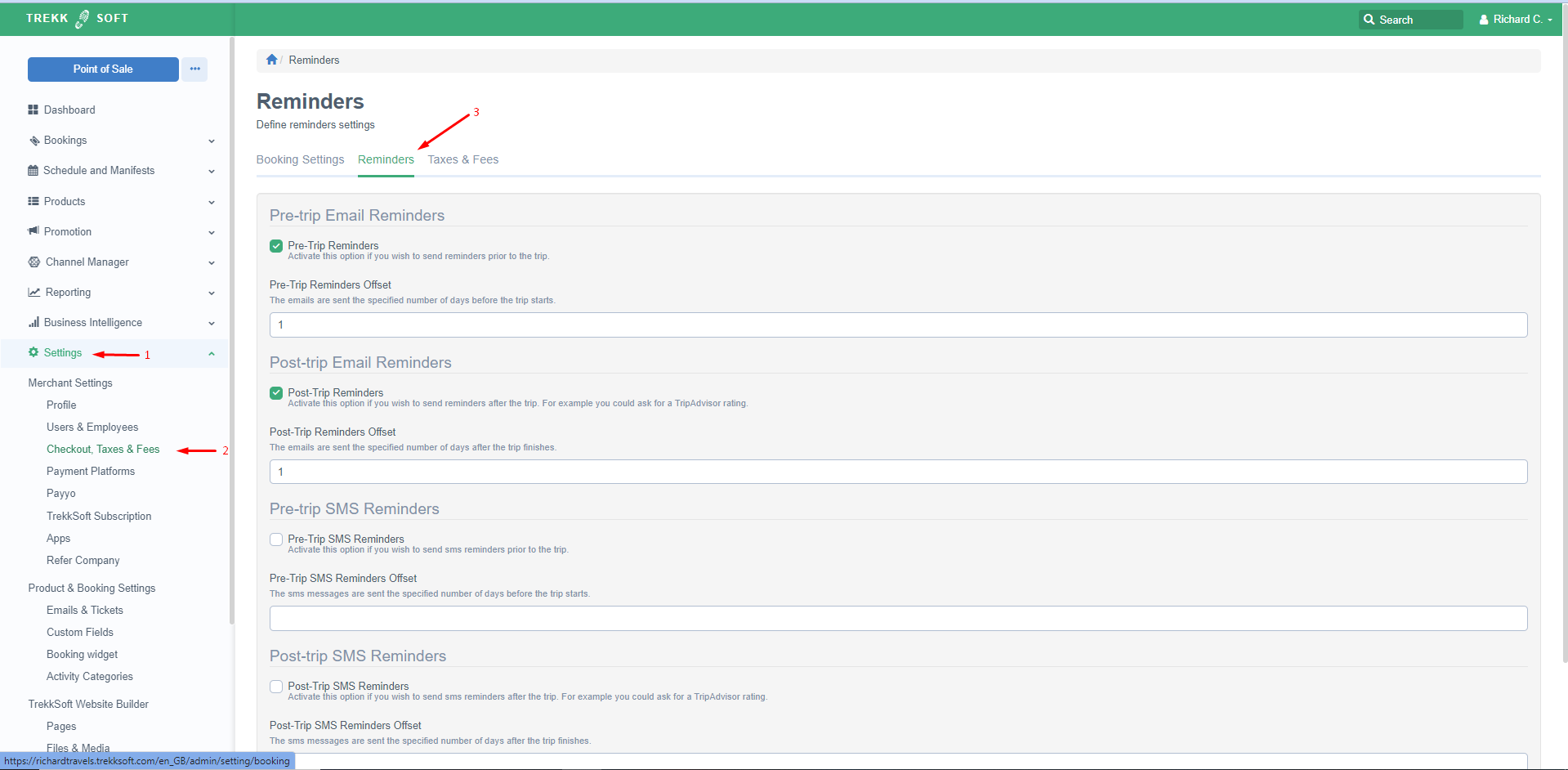
From there you can enable the pre/post trip reminders.
Note!
- Pre/Post trip reminders are sent to the Buying User email that is registered for the basket.
- If a Basket has been created after the Pre-trip reminder date, then the notification will not be sent out at all. This is due to likely you having a Cut-off time that should prevent customers from booking before that time, so we recommend that you remind them for the trip date when you are processing their booking.
Note!
- The confirmation emails, pre-trip and post-trip reminder will always consider the chosen basket language when it was created and send out the notification in the corresponding language
Article added 09/05/2026